
TruckMap - Truck GPS Routes
TenstreetMaps & Navigation
4.33.93K Reviews
- Version
- 8.0.12
- Installs
- 500.00K
- Age Rating
- Everyone
Screenshots
Our Review of TruckMap - Truck GPS Routes
 Analysis by Appyee
I approached TruckMap - Truck GPS Routes as a working tool rather than a casual map app. Its purpose is straightforward: help truck drivers plan routes with navigation, maps, and GPS guidance in one place. That focus matters because a route that looks perfectly reasonable in a regular car-navigation app may be unsuitable for a commercial vehicle. In my experience, the main value here is not simply getting from one address to another; it is having a navigation option built around the different decisions a truck driver has to make.
TruckMap is a free Maps & Navigation app from Tenstreet, rated 4.3 on average from around 8.2 thousand ratings and supported by more than 500 thousand installs. It is suitable for Everyone, so the interface is aimed at a broad audience, although the practical audience is clearly drivers who need truck-conscious route planning. The app has been available since the end of 2018, and version 8.0.12 is the current release. It runs on Android 9 or later.
Where drivers usually get stuck before the first trip
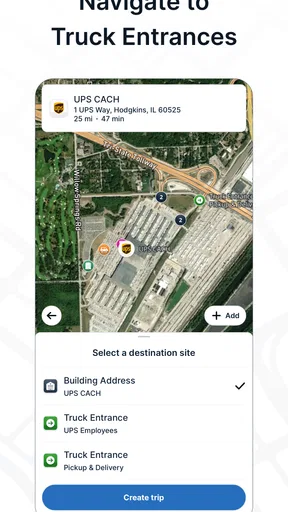
The first difficulty with any truck navigation app is not usually pressing the navigation button. It is entering a destination in a way that reflects the actual job. A driver may have a customer address, a warehouse name, a gate instruction, or a delivery point copied from a message. Those details are not always equally useful to a map. If the destination is entered as a company name or a general street address, the route may end at the public entrance instead of the truck entrance.
I would therefore treat the first route as a planning exercise, not something to launch while already moving. Check the destination before departure and make sure the final point makes sense for a large vehicle. This is especially important around industrial areas, where the correct road may lead to a rear loading entrance rather than the most visible address on the main road. A navigation app can guide a route, but it cannot replace checking the delivery instructions your dispatcher or customer provided.
Another common sticking point is expecting the app to behave exactly like a familiar car-navigation tool. Truck routing has a different purpose. A shorter-looking road is not automatically the better road, and a route that saves a few minutes on the screen may create a much more difficult approach for a long vehicle. I found it more useful to read the route as a recommendation that needs a quick sanity check, rather than as an instruction to follow without thinking.
The most important habit is to verify the final approach before you leave. Look at the broad route, identify the last major turn, and consider whether the destination is on a road that appears suitable for the vehicle you are driving. This small pause can prevent the most frustrating kind of navigation problem: following every instruction correctly and still arriving at the wrong side of a facility.
Why route preparation matters more for trucks
In a car, a missed turn may be an inconvenience. In a truck, it can become a long detour, a difficult turnaround, or a stressful approach through streets that were never designed for the vehicle. TruckMap is most useful when it is part of a preparation routine. I would enter the destination while parked, review the route, and keep the delivery notes available separately so that the map and the real-world instructions support each other.
Drivers should also avoid treating the displayed arrival estimate as a promise. Traffic, loading delays, roadworks, weather, and the time needed to find the correct entrance can all affect the trip. The app can help with route guidance, but it does not know every operational detail of a delivery. If a schedule is tight, leave room for the parts of the journey that navigation cannot predict.
The app is a better fit for someone who wants a dedicated truck-oriented planning option than for a driver who only needs occasional directions in a personal car. If you mainly walk, cycle, use public transport, or drive a small vehicle, a general map service may be simpler for everyday trips. TruckMap earns its place when vehicle suitability and delivery practicality matter more than a minimal interface or a familiar ecosystem.
Setup checks that prevent avoidable navigation trouble
Before relying on the app for a working route, I would begin with the basics: install it on a compatible Android device, open it while stationary, and make sure the phone can establish a reliable GPS position. The minimum operating system is Android 9, so older devices may not be appropriate even if they still run other navigation apps. A phone that is technically compatible but slow, nearly full, or struggling with its location signal can make the whole experience feel unreliable.
It is also worth checking the phone’s general navigation conditions before blaming the app. A weak position signal, aggressive battery management, poor mobile coverage, or an unstable connection can interrupt the experience. These are not unique TruckMap problems, but they are easy to overlook because the symptoms appear inside the map: a position that jumps, instructions that arrive late, or a route that takes too long to load.
My preferred setup is simple. I would mount the phone where the screen can be seen without blocking the road, connect it to dependable power, and start the route only after the vehicle is parked. Keeping the device cool and visible is more useful than constantly tapping the screen. A driver should not need to handle the phone repeatedly just to confirm the next instruction.
Do not begin by testing the app on the most demanding trip of the week. Use a familiar route first. That gives you a chance to understand how the map presents turns, how quickly the position updates, and how comfortable the voice or visual guidance feels in your cab. A short familiar journey is also the safest way to discover whether the phone mount, screen brightness, and power arrangement work in real conditions.
How I would prepare a delivery route
Enter the destination while parked and compare the result with the delivery address or instructions.
Review the full route instead of looking only at the first few turns.
Identify the final approach, especially around warehouses, yards, and industrial estates.
Start navigation only when the GPS position is stable and the phone is securely mounted.
Keep a safe fallback plan in mind if the signal, phone, or route guidance becomes unreliable.
This workflow may sound cautious, but it is exactly what makes a navigation app useful. The map should reduce mental workload, not encourage the driver to make last-second decisions while moving. I would also avoid entering complicated notes or searching for a destination while driving. If the address is unclear, stop somewhere safe and resolve it before continuing.
One practical trade-off is that a dedicated truck app may require more attention during setup than a general map app. That extra effort is worthwhile when the route needs vehicle-aware thinking, but it can feel unnecessary for a simple trip across town. The right choice depends on the job, not just on whether the app can draw a line between two points.
Recovering when a route does not behave as expected
When navigation appears to go wrong, the best response is to separate the problem into stages. First ask whether the phone knows where it is. If the position marker is inaccurate or slow to update, the issue may be GPS reception rather than the route itself. Move to a safe place, give the device a moment to settle, and avoid making a turn based only on a position that has not caught up with the vehicle.
If the location is correct but the route looks surprising, stop and inspect the destination and the next part of the journey. A small address mistake can produce a completely different final approach. This is where many drivers lose time: they assume the whole route is wrong when the real problem is that the destination pin is on the wrong entrance or the wrong part of a large property.
When the app seems frozen, I would use a calm recovery sequence rather than repeatedly tapping the screen. Confirm that the phone still has power, check whether other phone functions respond, and wait until the vehicle is parked before reopening anything. If the problem continues, a general map app or written route information can serve as a temporary backup. The important point is to preserve safe driving habits while troubleshooting.
After a missed turn, do not force a maneuver simply because the original instruction is no longer possible. Continue only when the road is suitable and the next instruction is clear. A truck often needs more space and time to recover from a missed turn than a car. I would rather take a longer, sensible correction than attempt an awkward turn or stop in an unsafe place.
Separating an app issue from a road issue
Sometimes the route is not the cause of the difficulty. Temporary road closures, construction, restricted access, a blocked yard entrance, or a customer’s changed delivery procedure can make an otherwise sensible route impractical. In those situations, the driver needs current information from the site or dispatcher, not just another recalculation.
This is one of the most important limits to understand. No navigation app can guarantee that every access road is open, that every private yard is available, or that a newly changed entrance is represented exactly as expected. TruckMap can help you plan and navigate, but the final decision still belongs to the person who can see the road and understand the delivery conditions.
If the same destination repeatedly causes trouble, save your own practical knowledge outside the navigation screen: the correct gate, the preferred approach, the safe waiting area, or the side of the facility used by trucks. That personal routine can make the app much more effective on later visits. The map supplies the route; your experience supplies the last-mile detail.
How it compares with ordinary map apps
General map apps are excellent for broad coverage, familiar search, business discovery, and everyday car journeys. They are often the quickest choice when I need a simple address or want to compare places nearby. Their weakness for truck work is that the route may be designed around ordinary road travel rather than the practical needs of a commercial vehicle.
TruckMap makes more sense when the vehicle itself changes the route decision. Its identity as a truck navigation app gives it a clearer purpose than a general-purpose map. I would choose it for planned freight movement, repeated delivery work, or any journey where the suitability of the road matters as much as the distance. I would not automatically replace every other map tool with it, because general apps can still be useful for checking businesses, entrances, traffic context, or a destination that is difficult to identify.
Using both types of app can be sensible, provided the driver does not create confusion by following two different sets of instructions at once. I would use TruckMap for the main truck-oriented route and consult a general map only while parked, when I need extra context about a location. The trade-off is a little more preparation in exchange for a clearer division of responsibilities.
The free price also makes it easy to test without committing money, which is useful for drivers who want to see whether the workflow suits them. Still, free does not mean effortless. The real cost can be attention, phone battery, data use, and the time spent checking destinations. Those are manageable costs, but they are part of using any navigation tool professionally.
Who should use it and who should choose something else
I would recommend TruckMap to truck drivers who want a focused navigation option for routes where vehicle suitability matters. It is also worth trying for fleet or delivery work in which the driver regularly moves between warehouses, customer sites, and industrial areas. The app’s broad adoption and its average rating of 4.3 suggest that it has found a useful place among many drivers, although ratings alone cannot replace testing it with your own phone and routes.
I would be more cautious about recommending it to someone who rarely drives a truck or only wants a polished general map for personal travel. If your priority is finding restaurants, comparing businesses, planning walking directions, or handling mixed transport, a broader navigation service may be more convenient. TruckMap is specialized enough that its strengths matter most when the trip has truck-specific consequences.
It is also not the right answer for a driver who expects navigation to remove all responsibility from the route. You still need to read signs, obey restrictions, react to road conditions, and confirm that a private entrance is usable. The app should support those decisions, not replace them.
For a new user, I would give it a fair trial over several familiar and unfamiliar trips rather than judging it after one awkward destination. Keep the first test simple, note where the route feels helpful, and pay attention to whether the final approach matches the real delivery process. That is a more meaningful test than merely checking whether the blue line reaches the address.
My practical verdict after using the workflow
TruckMap is most valuable when I use it as a preparation and guidance tool, not as an unquestionable authority. Its truck-focused purpose gives it a clear advantage over ordinary car navigation for commercial routes, while its free availability lowers the barrier to trying it. Tenstreet has built an app that fits a real need: helping drivers think about routes in terms of the vehicle and the delivery, not only the destination.
The main friction comes before and around navigation rather than from the basic idea. Addresses need checking, the phone needs a dependable setup, and unusual routes still require judgment. A weak GPS signal, a poor mount, an incorrect entrance, or a closed road can make the experience look worse than the app deserves. Good preparation solves some of those problems; the rest require a safe backup plan.
My recommendation is clear for the right audience: if you drive trucks and want a dedicated Maps & Navigation option, install the current version on a compatible device, test it while parked, and use it on a familiar route before trusting it with a demanding delivery. Keep a general map or other route information available as a backup, and always verify the final approach. Used that way, TruckMap is a practical companion for working drivers, while occasional car users will probably be better served by a broader everyday map app.
Verdict
Strengths of TruckMap - Truck GPS Routes
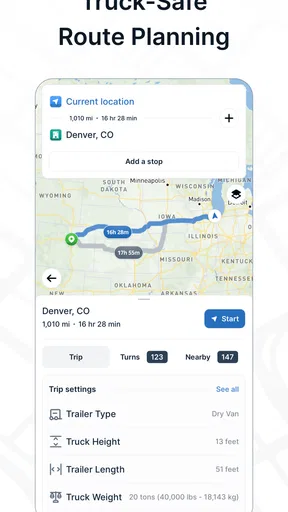
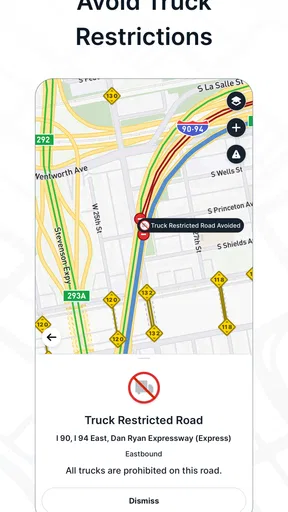
- Routes account for truck restrictions, including height, weight, and road limits.
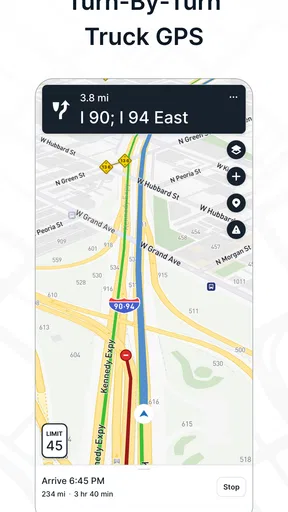
- Clear turn-by-turn guidance helps drivers stay focused on long trips.
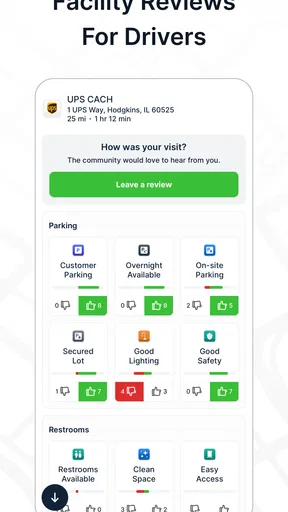
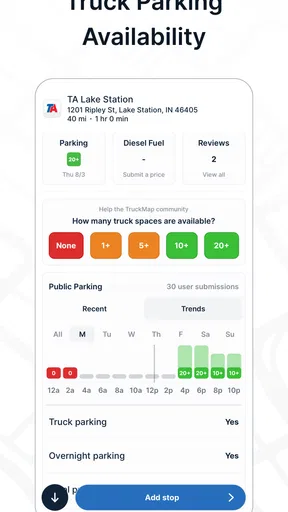
- Displays truck stops, parking areas, fuel stations, and service locations.
- Useful trip planning tools help estimate routes and arrival times.
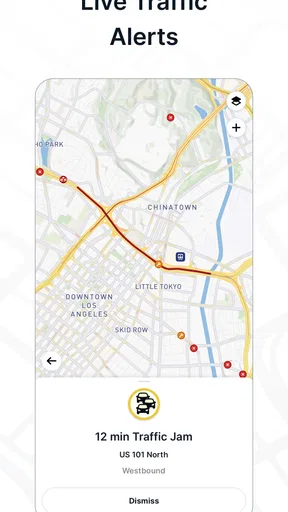
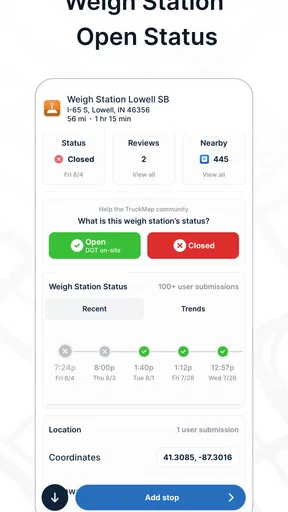
- Community reports can provide current information about hazards and closures.
Limitations of TruckMap - Truck GPS Routes
- Coverage and restriction accuracy may vary between regions.
- Some advanced features may require a paid subscription.
- The app can use significant battery power during extended navigation.
- A reliable mobile data connection is often needed for live updates.
- Map loading and route recalculation may feel slow on older phones.
Other Releases by Tenstreet
View All
Driver Pulse by Tenstreet
Business4.0
Similar Picks in This Category
View All
Uber - Request a ride
Uber Technologies, Inc.4.7


inDrive. Rides with fair fares
® SUOL INNOVATIONS LTD4.8

Yandex Go: Taxi Food Delivery
Mikromobilnost LLC Belgrade4.8

Bolt: Request a Ride
Bolt Technology4.8

Rapido: Bike-Taxi, Auto & Cabs
Rapido Bike Taxi4.8
Frequently Asked Questions
What is TruckMap - Truck GPS Routes, and who is it designed for?
TruckMap - Truck GPS Routes is a navigation app designed specifically for professional truck drivers and commercial vehicle operators. Unlike a standard car GPS, it focuses on truck-friendly routing and considers factors such as vehicle dimensions, road restrictions, weight limits, low bridges, and commercial access. It can be useful for long-haul drivers, delivery operators, fleet workers, and anyone who needs safer routes for a large vehicle.
Does TruckMap provide routes that account for my truck’s height, weight, and dimensions?
The app is intended to create routes based on commercial vehicle restrictions rather than treating your vehicle like a regular passenger car. Before starting a trip, drivers should carefully enter or confirm details such as height, weight, length, and hazardous-material requirements when available. Correct information is essential, because an inaccurate vehicle profile could result in unsuitable directions or roads that are unsafe or legally restricted for your truck.
Can I use TruckMap - Truck GPS Routes without an internet connection?
TruckMap may offer navigation features that depend on an active internet connection, including map updates, traffic information, search results, and certain route calculations. Offline availability can vary by region, app version, and the specific map data downloaded to your device. Drivers traveling through rural areas should check the app’s current offline options before departure and avoid relying on it as their only source of navigation.
Does TruckMap include truck stops, rest areas, fuel stations, and other driver services?
A major benefit of a truck-focused navigation app is access to points of interest relevant to commercial drivers. TruckMap can help users search for locations such as truck stops, fuel stations, parking areas, rest facilities, and other services along a route, depending on regional coverage and available listings. Information such as parking availability, hours, prices, or amenities may change, so it is wise to verify important details before arriving.
Is TruckMap - Truck GPS Routes reliable enough to use as my only navigation tool?
TruckMap can be a helpful planning and navigation companion, but no GPS application should be treated as the sole authority for every trip. Road restrictions, construction, weather, traffic conditions, signage, and local regulations can change quickly. Drivers should compare the suggested route with official road signs, dispatch instructions, and current regulations. Always confirm that the route is suitable for your exact vehicle before entering unfamiliar roads.
